|
Check out FullTiltPoker today and use our
FullTiltPoker Bonus Code for a $600 bonus.
Visit www.PokerStar.net for a $50 bonus when you use the
PokerStars Bonus Code.
PokerStars.com is the #2
Poker Online site immediately following
Full Tilt Poker.
For the best place to Gamble Online visit
TitanPoker today.
|
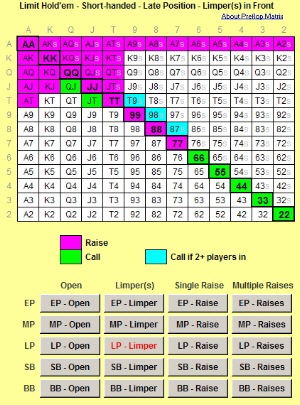 The Preflop Matrix spreadsheet is another tool to help beginning players master proper preflop play for limit Texas Hold'em. Different from the PreFlop Simulator, this tool allows you to enter the situation and quickly see the proper play.
It is designed to be used along side an open online poker table, while you're playing. Just click one button to describe your situation, and find your hand on the matrix chart to see how best to play your hand.
Even if you don't use this tool in real time while you're playing a game, it is very useful as an information tool also. Because of its unique matrix format to display all the possible pocket combinations, it visually demonstrates the hand rankings as they relate to position.
Newly Added: The spreadsheet allows you to select Tight Table, Loose Table, or Short-handed. Each one has differnt preflop advice that comes from very knowledgable sources.
If however, you have a different set of preflop requirements you'd like to use, the spreadsheet is easily reconfigurable. Just change the color of the cells in the matrix for each situation, and you have your own personalized set of guidelines.
Download Preflop Matrix
Save the Excel file to your hard drive. (You may have to unzip the file.) You must have MS Excel installed on your computer to run the program. To run the program, just open the .xls file, like you would any other Excel spreadsheet.
NOTE: If you have trouble getting the buttons to work, you probably need to lower the security setting within Excel to allow the use of macros. Do this by going to the "Tools" menu, "Options", and select the "Security" tab. Click on the "Macro Security" button and select "Medium" and hit "OK". Now close Excel and reopen the PreFlop.xls spreadsheet and choose "Enable Macros" when it opens. Everything should work fine now.
Features
- Different advice for tight table, loose table, and short-handed (6-max)
- Easy selections that allow you to quickly find your situation and play recommendation
- Compact display of all the possible starting hands
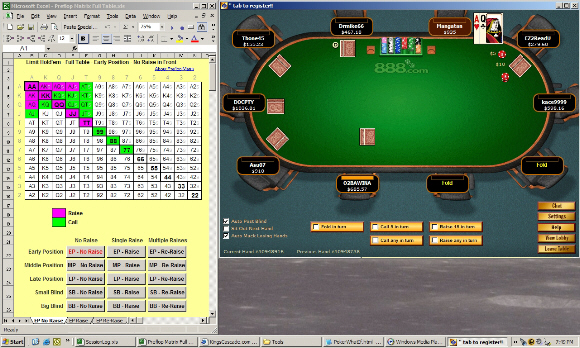
- Sized to fit along side an open online poker table (see picture below)
- Easily reconfigurable advice, so you can customize your own guidelines
If you have any questions or comments about the spreadsheet, feel free to send me an email.
|